writing / gear, my weikav experience
Weikav Lucky65 V3
last updated: November 14 2026
Overview
What came before this: Red Square Keyrox TKL
I bought a Red Square Keyrox about 4–5 years ago, and I haven’t had any major issues with it during that time. However, since getting a MacBook, I’ve realized that its keyboard is much more comfortable to type on than my TKL one. The TKL is bulky, the key travel is long, and the keycaps are narrow—many of them have even started to shine because I’ve simply worn them down. I don’t really use the F-keys, except perhaps for keybinds in games like Minecraft. On top of that, the keyboard lacks proper software, so I can’t remap any of the keys.
The cable design is absolute garbage. Whenever I lift or reposition the keyboard, the cable keeps popping out of the grooves it’s supposed to be pressed into, which makes the keyboard wobble. The stupidest part is that it’s thin enough that you don’t even notice it until you start typing. On the plus side, it’s braided—so it’s much less likely to tear—but that also means it catches on the desk surface more easily and ends up wearing down. The small power brick (or whatever that component is) also plays a role: the whole cable assembly is heavy enough to pull itself downward. Because it’s a fabric-covered cable, it’s constantly rubbing against things and snagging. This wouldn’t be an issue if they’d kept it lightweight, but it’s surprisingly heavy—especially considering the keyboard itself is plastic and weighs, I don’t know, maybe as much as 20 of these cables—which is just really bizarre.
Its feet are quite grippy—which should be a plus—but whenever I slide the keyboard across my desk with the feet extended (something that’s very easy to do, given how light it is—it’s almost become a habit of mine), it makes a terrible scraping noise. It’s about as loud as a rubber foot can possibly be. The switches themselves are also quite noisy. At first, I didn’t really pay much attention—they aren’t the loudest switches out there, after all, and I almost always wear headphones. But even so, compared to the keyboard on my MacBook, the noise was so noticeable that I felt uncomfortable using it at night. And that’s even though I live alone; back when I lived with my parents, I can’t recall a single day where I could type or play games late in the evening without it being an issue.
Sometimes the indicator lights — like Caps, SL, and NL — simply don’t work. It’s quite absurd, and neither updating the drivers nor anything else seems to fix it. This started about two years ago; I’ve mostly stopped noticing it since I don’t really look at the keyboard anyway, but it still bothers me that such a flaw exists at all. Since I’m already listing everything I don’t like, I might as well include this, too.
It has an open case, a skeleton. At first I thought that would actually be a plus, but it turned out to be no easier to clean — it just seems to get dirtier, and over time the shape of the case itself started to put me off visually. It looks kind of cheap.
The biggest con is the complete lack of replaceability. I could swap the switches and it would get quieter; I could swap the cable and that would remove another problem — but there’s no such option. Everything is soldered, and quite badly at that, considering I took it apart. You can buy keycaps, but they’re expensive and it clearly wouldn’t pay off, since it wouldn’t outweigh all the other cons.
Why 65%
I was choosing between 65% and 75%. Technically, the latter only differs by having an F-row, which is quite convenient in itself. However, to my regret, the vast majority of those keyboards had some kind of roller or knob, which I consider nothing short of absolute nonsense: I’m not a DJ, so I have no use for the thing, and I’m not a designer, so I can’t judge those who like it.
I also looked at the HHKB layout. I like how it looks, and my leaning toward Emacs and Vim keybindings only fueled that. The layout itself is one of the most compact out there, while still having all the keys I need without having to constantly use a function key or something like that. But the selection of HHKB-layout boards is pretty small, and what’s out there doesn’t quite give me what I want. As for the HHKBs themselves, they have a number of quirks I won’t list here, like using AA batteries instead of a built-in rechargeable cell, which is unusual in itself. I don’t think it’s anything terribly alarming, but why bother when there are far more convenient options?
Of course, I looked at plenty of other layouts too — I saw a lot of split keyboards and ergonomic layouts in general, but they were just too niche. I can’t imagine a scenario where I’d use any of them on a regular basis. 65% remained the middle ground that would make my TKL keyboard more compact and spare me the drawbacks I found in the other layouts.
How I got here and how I bought it
I didn’t research for as long as I could have. I’d been thinking about a keyboard since, I think, the beginning of October, and I bought one around late October — early November. In reality I’d considered buying one long before that, but kept putting it off because I just didn’t see a real need for it. I believe every purchase should be justified — there has to be a reason, the thing has to be necessary. And then I realized that, yes, I needed it. I type more and more every day, whether it’s chatting with my girlfriend, writing code, or just taking notes. This is an investment that should be something new for me — but not just new; something that actually covers my needs. Someday I’ll write about that here.
And that’s where I got stuck. Technically, I have problems I’d like to solve, but I just couldn’t talk myself into it because I considered the purchase extravagant. I have a keyboard that already covers my needs, but I can’t say it covers the problems it creates itself. I forgot about buying one for a while and set myself a goal: if I consistently type “fast,” I’d “earn” a new keyboard, since it would effectively be an investment in a skill. I don’t type especially fast, alas, but my numbers are above average. Still, I consider them low, since I spend far more time at the computer than an average person and, accordingly, should type faster — or at least, that’s what I think. Time went by, my typing speed crept up little by little each day, but the purchase happened rather by chance: I just decided that if I didn’t do it now, I wouldn’t be able to in the coming months.
So my choice fell on a custom keyboard in a Weikav case. Design-wise it suited me on almost every count, and, as the seller claimed, it was completely silent. I’d actually seen the listing ages ago, but nobody had really looked at it since, and the price of €60 was still a lot for me, considering I was buying a keyboard while already owning one. To me that’s just strange. Still, I did it — breaking my own rule about increasing my typing speed first. I won’t throw around words about how it’ll boost my speed; no, I didn’t pin such hopes on it. I wanted a quiet keyboard, first and foremost for comfortable typing. After about two weeks, I got it.
Day One — November 14, 2026
First impression and sound
My first impressions of the keyboard were pretty clear-cut. I was absolutely delighted by how quiet the keys were. I didn’t hear a single sound until I started typing fast enough to actually hear the switches at all. These are Haimu Heartbeats, and they’re just silent. At first I thought this was generally impossible and that the sound in person wouldn’t match the videos, but as it turned out, I was wrong. Of course, I’m not a keyboard expert and can be amazed by anything that other enthusiasts are already used to — but when you’ve stuck with one keyboard for 4+ years, the difference is incredible. With the variety on the market today, it’d be a sin to complain about anything. But of course, I have every right to.
Color and case
Initially I wanted a silver or black keyboard, since I thought those were the most versatile options, but red caught my eye somehow — and at the same time added a handful of doubts. I have a red mousepad, a red mouse — a red keyboard would look out of place, I thought. But to my surprise, it fit in rather well.
The aluminum case is something else — I can’t even describe it. It’s as if I’m holding a genuinely serious piece of work in my hands, not a toy.
What I managed to do on the first day
Naturally, I can’t name many technical details — I don’t understand that side of things, and my first-day experience was pretty short anyway. I wrote a little bit of code and played some World of Warcraft in the evening, around one o’clock. Again, I can’t list many pros, since I don’t know the technical side. But I did find some cons for myself on day one.
Cons
The cable and the port. First, the cable. Yes, it again — but this time, I think, it’s about the port. The cable just wobbles a bit in it. That’s not terrible in itself, but it’s unpleasant, and I also always have trouble lining it up and plugging it in. There’s nothing funny about it.
The Fn layer. Another issue is, in my view, a strange choice for Fn+. The strangest thing I noticed: ` and ~ — I just can’t type them out of habit. I can’t explain it, but in my mind it would be much better on Esc. In any case, I can remap it. As for the other keys, using Fn+HJKL seems painful. It’s not even the keys themselves, it’s that Home and End are assigned without any logic. In the Vim layout, J and K are down and up respectively — so why, having decided to use HJKL, did you map them to K and L? Well, of course, this is nitpicking; I can change all of it through VIA. For convenience, I’ll leave my whole layout here in a table.
| keys | function |
|---|---|
| fn+1 | f1 |
| fn+2 | f2 |
| fn+3 | f3 |
| fn+4 | f4 |
| fn+5 | f5 |
| fn+6 | f6 |
| fn+7 | f7 |
| fn+8 | f8 |
| fn+9 | f9 |
| fn+0 | f10 |
| fn+_- | f11 |
| fn+=+ | f12 |
| key combination | linux function |
|---|---|
| Fn+H | Scroll Lock |
| Fn+J | Pause Break |
| Fn+K | Home |
| Fn+L | End |
| Fn+Tab | ` |
| Fn+Left Shift+Tab or Left Shift+Esc | ~ |
| Fn+M (3s) | Win/Mac switch |
| Fn+PgDn | Lock F zone |
| Fn+Esc | reset keyboard |
| Fn+Space | check battery level |
| Fn+D (3s) | D light red - lowest delay; D light white - normal delay (default) |
| keys | Connection method | Comment |
|---|---|---|
| Fn+Q | Bluetooth connectivity (1) |
Short press Q/W/E to switch Bluetooth 1/2/3 channels, the blue light flashes slowly; Press and hold Fn+Q/W/E for 3 seconds, and the blue light will flash rapidly; Turn on the device, enter pairing, connect successfully, the key light follows the light effect; Bluetooth device name: NLucky65 V3 BT-1, NLucky65 V3 BT-2, NLucky65 V3 BT-3 |
| Fn+W | Bluetooth connectivity (2) | |
| Fn+E | Bluetooth connectivity (3) | |
| Fn+R | 2.4G Connection | Short press Fn+R to switch to 2.4 mode, the green light flashes slowly; Press and hold Fn+R for 3 seconds, the green light will flash rapidly; Enter pairing, plug in 2.4G receiver, successful connection, key light follows the light effect; 2.4G device name: Lucky65 V3 2.4G |
| Fn+T | Wired connection | Short press Fn+T to switch to wired mode, white light flashes slowly, connect to data cable; Wired device name: Lucky65 V3 |
The wireless mode switch. The wireless toggle hidden under the Tab key seems both convenient and inconvenient at the same time. If I ever want to take this keyboard somewhere, I think I’d have to bring a keycap puller so I can remove the key. But of course, I could just flip the switch before leaving. Either way, there are plenty of other places it could have been hidden just as easily, without sacrificing convenience.
Backlighting instead of indicator LEDs. Using the LED backlight instead of separate indicator lights is cool on one hand, not so cool on the other. For me it’s a wash — I don’t really look at them; I have a Caps Lock indicator in the top bar on Linux, and I’ve never really had problems with that. The other indicators, honestly, I never even used. But what I can note is Control: it’s used to show the battery level, which I think is great. If it weren’t for one thing: they literally have a light strip which, again, looks like an indicator. What’s it for? Presumably only to backlight the arrow keys.
Light strip. This was one of the main design cons that jumped out at me, but I got used to it in literally a couple of hours — I even started thinking it wasn’t such a bad design choice. Sure, you could say I’m just aiming for excessive minimalism, which is just as out of place as this light strip, but in my mind a plain, strict metal square looks like something so mesmerizing it’s hard to put into words. It’s space that we create for ourselves.
Design and Gehirn
Of course, I could talk a lot more about design, since I mostly looked at design choices in the first place. A big role was played by Danil HS's Baionlenja Gehirn review video https://www.youtube.com/watch?v=di8-9ssPdqQ, which I stumbled across completely by chance in my YouTube recommendations. In the video the author talked about the Baionlenja Gehirn, and I was incredibly taken with it: all that mystery and, precisely, the sense of things left unsaid, with its own lore — that’s something especially beautiful. The enigmatic image of Gehirn the Living Fossil, wedged beneath a keyboard, looks simply unbeatable — especially compared to what we get with the Weikav Lucky, where the clover looks really cheap.
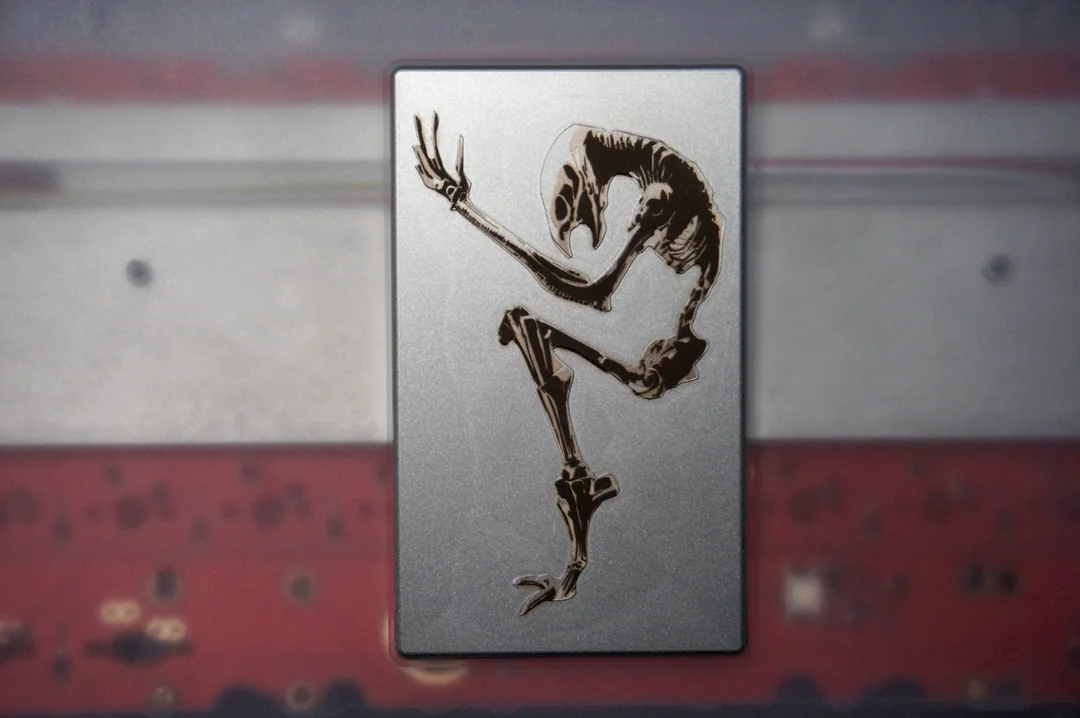
u/Certain_Muscle_7700
But of course, even though I have the money to buy a Gehirn, I decided to settle for what I picked — and besides, the price difference between them is nearly 7x, so any comparison doesn’t mean much. That said, I still think the design is very good, especially for the money: I bought a fully working, pre-built custom keyboard with an aluminum case for €60 — that’s already worth a lot. As for the Gehirn, let it remain my design reference for something I’d like to get in the future. Who knows — maybe I’ll go through more than one keyboard in the next five years.
Day One Wrap-Up
As I said, on the first day I couldn’t really say much about the keyboard. The experience was short, but I’ll be expanding this article over time with new details and my own opinions.